Posts

Xiaomi 14 Ultra issue: "Microphone is blocked" appears when recording video, but video works fine. Why?

Image
Microphone Notification Explained The notification you're seeing about your external microphone isn't a cause for alarm. It's a gentle alert about some minor, blocked features, put in place for your privacy. Think of it like a helpful reminder – the system is blocking certain advanced microphone features (things like background noise reduction or echo cancellation) to prevent unauthorized access. It's a safety precaution, like locking a door. These features, while useful for things like video calls, could potentially be misused. So, the system blocks them until you give the okay. It's a bit like a security gate; a little inconvenient to unlock, but it keeps things safe. How to Adjust Settings To stop the notification and use all your microphone's features, you'll need to adjust your settings: Turning a feature OFF in this case actually unblocks it. You're telling the system you understand and choose not to use that sp...
Image
My Apple Watch Says My Heart Rate is 42 BPM - Is This Normal? My Apple Watch Says My Heart Rate is 42 BPM - Is This Normal? So, my Apple Watch recently recorded my heart rate at 42 beats per minute (bpm). Naturally, I freaked out a little. Is this something I should be worried about? I took to the internet for some advice and received a mixed bag of responses, which I wanted to share with you all. Some people reported similar experiences, particularly during sleep or periods of rest. Apparently, a low resting heart rate can sometimes be a sign of good cardiovascular fitness, especially for athletes. This was slightly reassuring, but I'm no marathon runner. Others were more cautious, recommending a visit to a cardiologist. Their point was that peace of mind is priceless, especially if you're not in peak physical shape. This definitely made me think. Then there was the technical side of things. Some suggested the read...

[XIAOMI 14 SERIES] FOGGY LENS FIX

Image
Xiaomi 14/14 Ultra Camera Lens Fogging Issue Note: Possible Fixes Compiled A few people have encountered a moisture issue with the Xiaomi 14 and Xiaomi 14 Ultra. The camera lens fogs up, especially in cold and damp weather. As an early tester of the Xiaomi 14, I encountered this issue myself. It recurred for a few weeks, but I can now say mine is resolved thanks to the fixes below. I will continue to monitor in case the issue returns. Moisture Issue / Condensation / Foggy Lens This is what my Xiaomi 14 looked like when I first opened it; the main lens was completely covered in fog. The next day, the moisture issue recurred, but I noticed it was much less. Over the next few days, the fog lessened but didn't completely go away. Very few Xiaomi 14 Ultra users are encountering this issue, but when it occurs, usually, multiple lenses fog up. Photo Quality You will notice some haze and glows in photos if you are experiencing this issue. Probab...

What's the solution? SA-MP Mobile - App not installed as app isn't compatible with your phone - Poco X6

Image
 After updating to HyperOS I am unable to install SA-MP mobile. Below are two methods which we can follow to install the app. Method 1: Using an ADB command (no root required): Download and extract “Android SDK Platform Tools” on your computer. The downloaded file can be extracted anywhere you’d like, I extracted it to the C drive. Enable USB debugging on your phone. This is done in “Settings,” click on “About Phone,” then tap on the “Build number” seven times. This will display a message that you are now a developer. Go back to “System,” and you will see an option for “Developer options,” click it, then enable “USB debugging.” On your phone, you may see a prompt to allow USB debugging, select “OK.” Connect the phone to your computer with a USB cable. Open a command prompt window within the “Platform Tools” folder from step one. Transfer the APK file to the “Platform Tools” folder. For ease, rename the file to a shorter name (app.apk). Type in the following command replacing “app.a...

Poco X6 - How do I replace GetApps with Play Store?

Image
 When I search for app by default it goes to GetApps, but I want to use Play Store. Below is the screenshot explaining the issue:     The best way to do is to remove the bloatware by following below steps. These steps require laptop to remove all the bloatware in Xiaomi completely.   Phone Preparations: 1. Enable Developer Options. This is done by going to Settings>About Phone>MIUI Version. Tap the “MIUI Version” item five to seven times until you get a pop-up message that says “No need, you are already a developer.” 2. Enable USB debugging by going to Settings>Additional Settings>Developer Options. Tap the “USB debugging” switch. You will receive an “Important Warning” message. Tap “Accept.” Computer Preparations: 1. You need a computer, and two small files, latest_usb_driver_windows.zip and adb-setup-1.4.3.exe. 2. Install latest_usb_driver_windows.zip. Right-click and choose “Extract here.” 3. Install adb-setup-1.4.3.exe by double-clicking the file and ...

Poco X6 PRO Could'nt add fingerprint. Any Fix or solution?

Image
 Reason: This may be due to hardware fault, because I tried re-installing the OS still it didn't fix. So you should go to the service center.   Below are some other solutions that I tried: Solution 1: Check for hardware issues. Open Settings. Tap About phone. Tap Detailed info and specs. Scroll down to Kernel version. Tap Kernel version several times. You should enter CIT or hardware test mode. Scroll to Fingerprint sensor test, and tap Test. Check if it says pass. If it does, tap Fingerprint enrol test to check if the sensor works. If not, take the device to a Xiaomi service center for repair. Solution 2: Clear fingerprint test apps cache and data. Open Settings. Scroll down and tap Apps. Tap Manage apps. Tap the three dots, and select Show all apps. In the search bar, type “finger.” Tap Fingerprint test from the results. Tap Clear data. Select Clear cache. Tap OK. Tap Clear all data. Tap OK. Clear the cache and data of other apps related to fingerprints, if applicable. Resta...

How to Use the Side Button as a Camera Shortcut on Android?

Quickly access your camera even when your Android phone is locked! Just double-press the power button or side key. This feature is usually enabled by default, but you might need to check your device's settings if it's not working. Here's how: Open your phone's Settings app. Search for "Gestures": The quickest way is usually to use the search bar within the Settings app and type "gestures," "buttons," or "shortcuts." Look for Power Button/Side Button settings: You might see an option like "Power button," "Side key," "Buttons," or something similar. Tap on that. Find the Camera Shortcut: Look for an option related to quickly launching the camera. Common wording includes: "Open camera" "Launch camera" "Quick launch camera" "Double press power button for camera" Enable the shortcut: If the option is present but off, toggle it on.    

Motorola Edge 50 Pro Auto-Connect Wi-Fi Issue - Known Networks Not Connecting

Image
Experiencing Wi-Fi connectivity problems with your Motorola Edge 50 Pro?  Specifically, is your phone failing to auto-connect to known or saved Wi-Fi networks?  This issue, also reported on the closely related Motorola Edge 50 Fusion, was previously impacting users.  Fortunately, a recent software update has addressed this auto-connect bug.  Ensure your device is running the latest software version to resolve this connection issue.  Check my latest update which solved this issue.

List of Phones affected by Green line

Image
Realme Realme GT 2 Pro Realme X7 Pro    Oppo: Oppo Reno 5 Pro 5G  OPPO Find X5 Samsung: Galaxy S20 series (S20, S20+, S20 Ultra) Galaxy S21 series (S21, S21+, S21 Ultra) Galaxy S22 series (less common than S20/S21) Galaxy Note 20 Ultra Galaxy A71 Galaxy A52/A53 OnePlus: OnePlus 8 OnePlus 8T OnePlus 8 Pro OnePlus 9 OnePlus 9 Pro   Motorola: Moto Edge 20 Moto G73 5G  Motorola G82  Motorola G52  Vivo: Vivo X80 series Vivo X70 Pro+

User Feedback of Infinix Zero Ultra

Image
💖 What People Like: ⚡ Super Fast Charging: Reviewers are blown away by the blazing-fast charging speeds, with the 180w charger juicing up the phone in under 20 minutes! ✨ Premium Design & Display: Prepare to be dazzled by the phone's sleek design and stunning display. The curved waterfall screens and vibrant colors are a feast for the eyes. 💰 Value for Money: You get a lot of bang for your buck with this phone! Its impressive features and performance exceed expectations for its price point. 📸 Good Camera: While not perfect, the camera, especially the 200MP main lens, captures impressive photos. Users love its image quality, portrait mode, and night mode capabilities. 🚀 Overall Performance: Experience smooth sailing with this phone's responsive performance. It handles everyday ta...

realme 12x 5G vs Vivo T3x 5G vs Samsung Galaxy F15 5G - Rs.14999

Image
Smartphone Showdown: realme 12x 5G vs Vivo T3x 5G vs Samsung Galaxy F15 5G realme 12x 5G I recently picked up this phone and overall, I'm pretty happy with it. For the price, it's a great deal. While it doesn't have all the fancy bells and whistles, like air gestures (maybe in a future update?), it gets the job done. Honestly, I wasn't too fussed about the camera and bought it for other reasons. It's not bad, but it's not the phone's selling point. However, I was impressed by the performance – it's smooth and handles multitasking like a champ! Pros & Cons Pros Cons Great value for money: You get a lot of phone for the price. Missing some features: Air gestures would be a nice addition. Smooth Performance: No lag, even with multiple apps running. Camera is just okay: Not bad, but not amazing either. Fast charging: A real time-saver! Could ...

POCO C65 review - value for money under Rs.7000

Image
POCO C65 (Pastel Green, 128 GB) Review My POCO C65 (Pastel Green, 128 GB) Review What I Liked ✅ Value for money: This phone is a steal for the price! It's packed with features that you'd expect from a much more expensive device. Battery Backup: I can easily go a full day without needing to recharge. 🔋 Design: The Pastel Green looks so elegant. I've gotten a ton of compliments on how stylish it looks! 👍 Display: The screen is really smooth and the resolution is crisp. 👀 Performance: It does lag sometimes, but overall it's pretty fast, especially considering the price. The processor seems to be doing a good job. 💪 Large Screen Size: The 6.74-inch screen is perfect for watching videos and playing games. 📺 What Could Be Better ❌ Camera Quality: I was a little disappointed with the camera. It's a 50MP camera but sometimes the photos lo...

Phone with wireless charging, 5G and Gorilla glass under Rs. 40,000 - 2023

Image
 I was searching for a phone for my personal use, which has following features: Wireless Charging 5G Indian Bands Gorilla Glass Why Wireless Charging? I dropped my previous phone in water, and it entered the charging port. Now, the charging through wire is un-reliable. It works intermittently. Luckily my phone had wireless charging, I bought a wireless charger for Rs.700 from Amazon and spent my days. Though it was slow, at least my phone was usable. I don't want to repair my phone just to change the charging port, because I had bad experience replacing charging port for previous phone. To change the charging port, repair shop dude will rip open the phone, which creates entry for dust.  This makes wireless charging a viable option to keep your phone charged in case of emergency. Why 5G? With current 5G networks only available in Metro cities, we can live without this feature. But, paying 40K I expect my phone to last 3 years. Anything can happen in 3 years. 5G adoption may inc...

m3u8 crossdomain access denied

Image
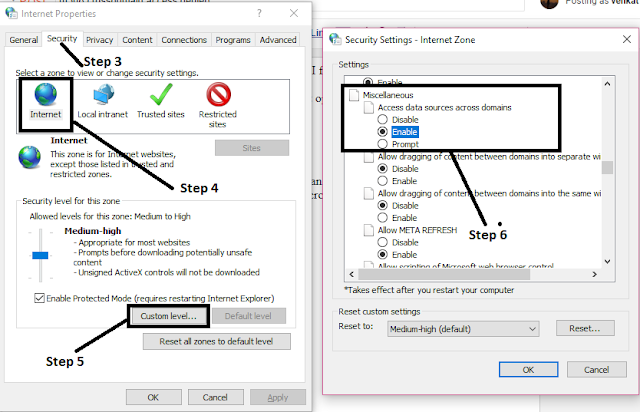
I got this error when I tried to play Live TV from a website. I fixed it by following this procedure: You can ignore this error by changing the settings in internet options. Step 1: Open internet explorer Step 2: Go to "Internet Options" Step 3: Click"Secuirty" tab Step 4: Click "Internet" icon Step 5: Choose "Custom Level" and scroll down to "Miscellaneous" Step 6: One of the options should be "Access data sources across domain" - set this to "Enable".

Why I sold my iPhone X?

Image
I have been using iPhone X for almost 4 months. I switched to iOS from stock Android variants like Nexus which I used as my daily driver. I watched too many reviews about iOS before buying this phone. One thing which I noticed is that it has very good app optimization, apps won't hang these are the few reasons which made me to switch to iOS. One video which compared iPhone X with Pixel 2 to see how long the phone takes to open the app. At every test iPhone X won easily against all Android phone. I got convinced and I bought this for almost 90000 rupees. Why I decided to sell this phone? First thing is notch. In the reviews people said that we will be used to the notch. However in my case I watched lot of movies and TV series in phone and you can never miss the black patch that is left for notch. Because of this notch I feel the user experience is not so great. I felt I could have gone for MI Mix 2 which has edge to edge display. The next thing which I hate in iPhone X is f...

Jio media cable M533 and M532

Image
What is Jio media cable? This is a dongle to convert normal TV to smart TV. Using this cable you will get free data from Jio and you can watch free movies and TV channels. There are two variants in Reliance jio media cable. Phone comes with red colour packing and another comes with blue colour packing. The red colour box (model M 533) comes with HDMI input and the blue box (model M 532) comes with RCA cable input. You can find more information about the two variants in the back side of the box. What is in the box? In the box you will get a warranty card, manual, power cord and dongle. We use this dongle to connect to the TV and Jio phone How to use this Jio media cable? We need a TV, jio media cable dongle and Jio phone. In one end connect to the Jio phone and the other end connect to the TV. You need to use your jio phone to control the TV. There is no need for additional software or drivers. Once Jio phone is connected, you can use the app in the Jio phone to stream t...

Android P features

Image
Google have released the developer preview for Android P on March 8 2018. Google haven't revealed what the letter P stands for. There are a lot of new features in this version but Google haven't shown of. This post contains some latest features from Android P. The features I am going to present in this post are from early developer preview. Phones that support Android P: At present developer preview is available only for Pixel phones. I have manually flashed in my Google pixel. Features in Android P First main feature that you will notice in Android P is the support for notch like you see in iPhone X. It has native support for notch, so we can expect many new phones with notches this year. There is option to change the notch size as well. The width of the notch can be changed to accommodate iPhone X or you can reduce the notch size to fit essential phone. Basically you have different option to tweak the notch size. Changes to messaging app The recent messages are av...

Best laptop under 50000 in India 2018

Image
People usually come by this question "which laptop to buy under 50000 rupees"? I would always suggest to go for Macbook Air which you can buy from the price range of 42000 rupees to 50000 rupees. Usually MacBook Air will be charged above 50000 but if you wait for offers you can definitely get for 42000 rupees. However, if you have no plans like which software you are going to use and if you use to open some documents daily internet browsing etc Macbook is the best. If you are going to buy laptop for a specific need for example to run Tally software, electronics software like NI Multisim these software won't run in Mac. Before going to buy Mac check whether the software will support MacOS. If it doesn't support, I suggest you to go for a Windows laptop. Why MacBook? First reason is Apple's hardware performance is phenomenal. I have a 3 year old MacBook Air which still looks new. It worth every penny you pay for. The laptop is very lightweight and you can ...

Fitbit Alta HR review after 90 days

Image
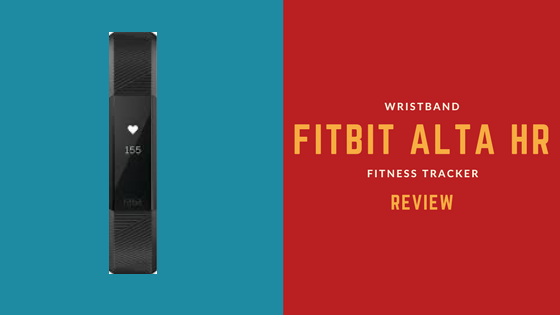
I bought Fitbit Alta HR from Flipkart 3 months back. It costed me 17500 rupees at that time and now it cost 15000 rupees. I can see your listing with 17000 rupees in Flipkart. Currently there are few offers in for the same band and it cost about 12500 rupees. The word HR means heart rate so it has heart rate sensor. What I noticed first in Fitbit Alta HR? First thing I saw in this band is it has a traditional railroad style strap. It is a attractive device and people will mistake it for bracelet. It is a basic fitness tracker watch which will count the number of steps taken and the distance travelled and the calories burnt. After using for 2 days you will notice that it also tracks your sleep. The touchscreen doesn't work like traditional way, you just need to tap on the device to see various options. Typing is the only way you will be interacting with the device. Fitbit app The device itself gives very less information. To get more detail we have to install a app in y...

Redmi Note 5 Pro Pros & Cons

Image
I bought my Redmi Note 5 on 22nd February on the Flipkart flash sale. I have been using this phone for almost 2 weeks. In this post I have listed the pros and cons of  Redmi Note 5 Pro. Key points Launch date - February 2018 RAM -  6 GB / 4 GB Storage -  64GB Chipset -  Snapdragon 636 Price -  17K rupee for 6 GB RAM variant and 14K rupee 4 4GB RAM variant What I like in Redmi Note 5 Pro The build quality of the phone is good and it looks modern with 18:9 screen ratio. It is easy to hold in a single hand even though the screen size is almost 6 inch. The front part of the phone look stylish with no physical keys and looks like a bezel less screen. In the back we have a dual camera which is placed like iPhone X.This phone has got an LED and lights up when you get the notification. This phone has a single speaker at the bottom and it is loud. you also have 3.5 mm headphone jack at the opposite side of speaker. The cellular network reception is very ...